
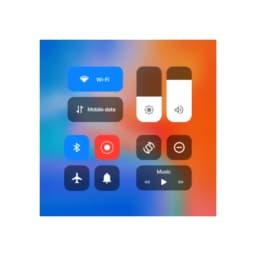
स्क्रीनशॉट
iCenter OS16 - कंट्रोल सेंटर के बारे में
iCenter OS16 - कंट्रोल सेंटर आपके Android डिवाइस पर iOS 16 का सहज डिज़ाइन लाता है, जो आपको उन नियंत्रणों और सेटिंग्स तक सुव्यवस्थित पहुंच देता है जिनका आप सबसे अधिक उपयोग करते हैं। एक आधुनिक इंटरफ़ेस के साथ अपने फ़ोन को प्रबंधित करें जो सब कुछ एक स्वाइप या टैप की दूरी पर रखता है।
आवश्यक नियंत्रणों तक त्वरित पहुंच
ऊपरी-बाएं से सूचनाएं खींचें या ऊपरी-दाएं से कंट्रोल सेंटर खोलें ताकि तुरंत अपने सबसे अधिक उपयोग किए जाने वाले टूल तक पहुंच सकें। संगीत प्लेबैक, कैमरा, फ्लैशलाइट, कैलकुलेटर, स्क्रीन रोटेशन, Wi-Fi, मोबाइल डेटा, ब्राइटनेस, और ब्लूटूथ सभी एक ही स्क्रीन से उपलब्ध हैं। सूचना केंद्र iOS 16 के समान काम करता है, जो आपको अपने वर्तमान ऐप को छोड़े बिना अलर्ट का जवाब देने देता है। वॉल्यूम और ब्राइटनेस समायोजन स्वाइप जेस्चर पर प्रतिक्रिया करते हैं, जो सूक्ष्म समायोजन को सहज बनाते हैं।
स्मार्ट टॉगल्स के साथ अपने वर्कफ़्लो को सुव्यवस्थित करें
एक टैप से Wi-Fi, मोबाइल डेटा, ब्लूटूथ, और स्क्रीन ओरिएंटेशन लॉक को सक्षम या अक्षम करें। एक समर्पित डू नॉट डिस्टर्ब मोड कॉल और सूचनाओं को शांत करता है जब आपको फोकस समय की आवश्यकता होती है। वन-टैप शॉर्टकट आपको कैमरा, अलार्म, टाइमर, और वॉयस रिकॉर्डर तक तुरंत पहुंच देते हैं—अपने ऐप ड्रॉअर में खोजने की आवश्यकता नहीं। कंट्रोल सेंटर आपके म्यूजिक प्लेयर की स्थिति को याद रखता है, इसलिए प्लेबैक नियंत्रण हमेशा तैयार रहते हैं जब आपको उनकी आवश्यकता हो।
दिखावट और अनुभव को अनुकूलित करें
कंट्रोल सेंटर समायोज्य बैकग्राउंड स्टाइल और सूचना दिखावट विकल्पों के साथ आपकी पसंद के अनुसार अनुकूलित होता है। अपने फ़ोन पर किसी भी ऐप के लिए शॉर्टकट जोड़ें, कंट्रोल सेंटर को आपके दैनिक कार्यों के लिए एक व्यक्तिगत हब में बदलते हुए। कार्यक्षमता और सौंदर्यशास्त्र का यह संयोजन का अर्थ है कि कंट्रोल सेंटर बिना अव्यवस्थित महसूस हुए उपयोगी बना रहता है।
जेस्चर समर्थन के साथ सहज नेविगेशन
स्वाइप करना आपके नेविगेट करने का मुख्य तरीका बन जाता है—सूचनाओं के लिए ऊपरी-बाएं से खींचें, या ऊपरी-दाएं से कंट्रोल सेंटर तक पहुंचें। ये सहज जेस्चर महत्वपूर्ण कार्यों तक पहुंचने के लिए आवश्यक चरणों को कम करते हैं, वॉल्यूम समायोजित करना या ब्लूटूथ टॉगल करना जैसे सामान्य कार्यों को तेज़ करते हैं।
iCenter OS16 - कंट्रोल सेंटर के साथ आधुनिक डिवाइस नियंत्रण को अपनाएं, जो Android उपयोगकर्ताओं को iOS 16 के इंटरफ़ेस का सुव्यवस्थित अनुभव देने के लिए डिज़ाइन किया गया है। Android 5.0 या उच्चतर की आवश्यकता है।
फ़ायदे और नुकसान
फ़ायदे
- iOS-style control center brings familiar interface to Android
- Quick toggles for Wi-Fi, Bluetooth, Do Not Disturb, and more
- Customizable shortcuts let you add any app to the control center
- Gesture-based navigation reduces steps to access common functions
नुकसान
- Adds a persistent system-level overlay that may impact battery life
- Requires permission to intercept notifications and system controls
- Customization options may be confusing for users unfamiliar with iOS
- Could conflict with your device's native control center or launcher
iCenter OS16 - कंट्रोल सेंटर के बारे में अक्सर पूछे जाने वाले सवाल
क्या iCenter OS16 - कंट्रोल सेंटर डाउनलोड करना सुरक्षित है?
Unstore पर iCenter OS16 - कंट्रोल सेंटर के इस वर्ज़न की मैलवेयर स्कैन रिपोर्ट अभी उपलब्ध नहीं है। केवल भरोसेमंद स्रोतों से फ़ाइलें इंस्टॉल करें और अपने डिवाइस की सुरक्षा चालू रखें।
iCenter OS16 - कंट्रोल सेंटर के लिए सिस्टम आवश्यकताएं क्या हैं?
iCenter OS16 - कंट्रोल सेंटर Android पर चलता है। डाउनलोड का साइज़ 30.5 MB है।
iCenter OS16 - कंट्रोल सेंटर का नवीनतम वर्ज़न कौन-सा है?
Unstore पर iCenter OS16 - कंट्रोल सेंटर का नवीनतम वर्ज़न 6.3.6 है। इसे आखिरी बार 10 अगस्त 2026 को अपडेट किया गया था।
iCenter OS16 - कंट्रोल सेंटर को कौन विकसित करता है?
iCenter OS16 - कंट्रोल सेंटर को Zayzik : LED Keyboard Studio ने विकसित किया है।
संबंधित ऐप्स

AlienGUIse
Windows के लिए डेस्कटॉप थीम और मैनेजर — 5 भविष्यवादी डिज़ाइनों से अपने सिस्टम को बदलें।

SharpKeys
Windows पर ऐप्स, मीडिया नियंत्रण और कस्टम कमांड लॉन्च करने के लिए कीबोर्ड कुंजियाँ रीमैप करें।

RocketDock
Windows के लिए डेस्कटॉप लॉन्चर — अनुकूलन योग्य आइकन और स्थिति के साथ त्वरित पहुँच डॉक।

Custom Resolution Utility (CRU)
डिस्प्ले रेजोल्यूशन यूटिलिटी: सटीक रिफ्रेश रेट नियंत्रण के साथ अपने मॉनिटर के लिए कस्टम रेजोल्यूशन बनाएं।

Lagguy Wallpapers
Lagguy
Android के लिए 4K और HD वॉलपेपर — मिनिमल, अब्सट्रैक्ट, नेचर, AMOLED डिज़ाइन, लाइफटाइम एक्सेस के साथ

Lock Screen OS
Apps Genz
विजेट्स, फोटो और नोटिफिकेशन के साथ अपनी लॉक स्क्रीन को कस्टमाइज़ करें। Android की डिफ़ॉल्ट लॉक स्क्रीन बदलें।
नवीनतम लेख

मुफ़्त ऑनलाइन दौड़ने की गति कैलकुलेटर: स्प्लिट, रेस प्रिडिक्टर और दैनिक चुनौती, कोई डाउनलोड नहीं
Oct 6, 2026

फ्री ऑनलाइन रोमन न्यूमेरल कन्वर्टर: तुरंत, कोई साइनअप नहीं, आपके फोन पर काम करता है
Oct 6, 2026

अपने ब्राउज़र में एक मुफ़्त Color Ball Sort Puzzle-शैली का गेम खेलें (कोई डाउनलोड नहीं)
Oct 6, 2026

अपने ब्राउज़र में एक मुफ़्त Beach Buggy Racing शैली कार्ट रेसर खेलें (कोई डाउनलोड नहीं)
Oct 6, 2026

अपने ब्राउज़र में एक मुफ़्त Alto's Adventure-शैली का गेम खेलें (कोई डाउनलोड नहीं)
Oct 6, 2026